 +1 888 285 9583
 +33 4 12 39 27 40


A real-world case of an HR assistant agent at an 800-employee Canadian manufacturer. Architecture, data sources, governance, and usage measurement.
Copilot Studio: what is it, really?
Microsoft 365 Copilot answers questions using your data in SharePoint, OneDrive, Teams, and Outlook. Microsoft 365 Copilot finds the policies stored in SharePoint, such as the mileage reimbursement policy, but it needs an agent to check a vacation balance in the HR system or to start a request, such as reporting a workplace injury.
That's exactly what Copilot Studio is for: building custom conversational agents wired into your specific data sources (Dataverse, SharePoint, SQL, business APIs), accessible from Teams, from a website, or published as agents in Microsoft 365 Copilot.
This isn't a 2018-era chatbot. It's a generative AI layer that orchestrates searches, API calls, and actions - all through a low-code canvas.
Real-world case: an HR assistant agent at an 800-employee manufacturer
To make it concrete, here's the case of an HR agent deployed at a Canadian manufacturer in early 2025. The context: 800 employees across 4 sites, and a 6-person HR team swamped by repetitive questions (40% of their time spent answering questions whose answers are already in the policies).
The goal: build a Teams agent available to every employee, able to answer the 80% of common questions 24/7 and to intelligently route the other 20% - the ones that need a human - to the HR team.
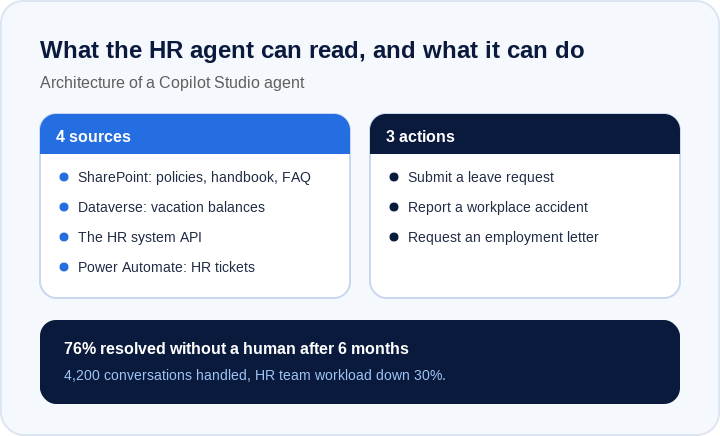
Result at 6 months: 4,200 conversations handled by the agent, a 76% self-resolution rate, a 30% reduction in the HR team's workload, and user satisfaction of 4.3/5.
The agent's architecture
The agent combines four data sources and three actions:
- Source 1 - SharePoint: HR policies, the employee handbook, FAQs. Indexed automatically by Copilot Studio (Generative Answers).
- Source 2 - Dataverse: a table of vacation/sick-day balances per employee, synced nightly with the HRIS.
- Source 3 - HRIS API (BambooHR in this case): real-time retrieval of personal employee information.
- Source 4 - Power Automate flow: automatic creation of HR tickets in the ticketing system whenever the agent can't answer.
- Action 1 - Submit a time-off request (manager approval via an approval workflow).
- Action 2 - Report a workplace injury (creates a record in the OHS system, logs it in the register and prepares the notice to the CNESST).
- Action 3 - Request an employment verification letter (PDF generation plus email delivery).
Four weeks, week by week
The project was delivered in 4 weeks - a pace we recommend for this kind of focused agent:
- Week 1 - Scoping: 6 employee interviews and 2 workshops with the HR team to identify the 30 most frequent use cases. Defining the scope. Deciding "what the agent does / what it doesn't do."
- Week 2 - Build: setting up Copilot Studio, ingesting SharePoint, designing Dataverse, writing the first manual topics for the critical cases, and testing with 5 users.
- Week 3 - Integrations: HRIS API, Power Automate flows, Entra ID SSO authentication, and Purview sensitivity labels on employee data.
- Week 4 - Pilot and hardening: testing with 50 employee volunteers, tuning the system prompts, setting up the human fallback, and governance (data retention, audit logs).
- Broad launch in week 5 with internal communications, manager training, and weekly oversight for the first 4 weeks.
Governance and security
An HR agent handles sensitive personal data. The non-negotiable controls:
- SSO authentication is mandatory: the agent knows who's talking and reveals only that employee's data.
- Purview sensitivity labels on every source: an HR document labeled "Confidential - Internal" is restricted from being shared by the agent.
- Power Platform audit logs enabled: every conversation is traceable and exportable in the event of a Law 25 audit.
- Power Platform DLP policies: this agent is barred from connecting to consumer connectors (Gmail, Twitter, and the like).
- Retention policy: conversations are deleted automatically after 90 days, except in the case of an active dispute.
- Transparency: clearly tell employees they are talking to an AI agent and provide a human fallback. If the agent makes a fully automated decision, Section 12.1 of Law 25 requires informing the person and letting them have it reviewed.
Usage measurement and ROI
Without measurement, an agent dies within 6 months. The metrics we track:
Volume - number of conversations, by topic, by site, by day of the week. This surfaces peaks and emerging topics.
Self-resolution rate - the percentage of conversations that end without human escalation. Target: > 70%.
User satisfaction - a 1-5 rating requested at the end of each conversation. Target: > 4/5.
Time saved - extrapolated: (number of resolved conversations × average HR time saved per request). For this client: ~120 hours/month.
Total cost - Copilot Studio plus Dataverse licensing plus maintenance. Here: $2,400/month in production. Net positive ROI by month 3.
When Copilot Studio is the right fit
Copilot Studio shines in cases like these: an HR assistant (vacation, policies, onboarding), a Tier 1 IT assistant (passwords, access, ServiceNow FAQs), an internal sales assistant (catalog, configurator, order status), and a public-sector assistant (citizen information, online services).
Conversely, Copilot Studio is not the right answer for: generating creative content (use Microsoft 365 Copilot), analyzing complex documents (use Microsoft 365 Copilot with SharePoint access), or doing quantitative prediction (use Power BI plus ML).
The classic trap: trying to build one mega-agent that does everything. You're far better off with 4 specialized agents that each do one thing well.
Sources
- Add SharePoint as a knowledge source in Copilot Studio (Microsoft Learn)
- Microsoft Purview data security and compliance for Copilot Studio (Microsoft Learn)
- Configure data policies for Copilot Studio agents (Microsoft Learn)
- Act respecting the protection of personal information in the private sector, section 12.1 (LégisQuébec)
Want to talk it through?
Let's spend 30 minutes on your situation.
A free assessment with the io4 team. No commitment, no pressure.
Book my assessment