 +1 888 285 9583
 +33 4 12 39 27 40


Lakehouse, Direct Lake, Copilot in Power BI, Purview governance. The realistic first steps for a Quebec SMB that wants to modernize its analytics without breaking everything.
Why Microsoft Fabric, and why now
Microsoft Fabric reached general availability in late 2023. By 2026, it has become Microsoft's unified analytics platform: data engineering, data warehousing, data science, real-time analytics, and business intelligence, all in a single SaaS experience built on shared storage (OneLake).
For a Quebec SMB that had been torn between Power BI Premium, Azure Synapse, Databricks, and third-party solutions, Fabric makes the choice dramatically simpler. One Fabric capacity (from F2), one platform, one learning curve.
The timing is good because Microsoft has stabilized Direct Lake (the mechanism that lets Power BI query data with no copy and no refresh), because Copilot in Power BI is now usable in production, and because governance through Purview is built in natively.
Fabric vs. Power BI Premium: what changes?
If you have a Power BI Premium capacity (P1, P2, P3), Microsoft retires it at the end of your current agreement: the move to a Fabric F capacity (F64 for a P1) happens workspace by workspace, and your reports keep working. On top of that, you gain:
- A native Lakehouse (OneLake): Delta Parquet storage, accessible via SQL or Spark, with no need to stand up a separate Azure Data Lake.
- A serverless SQL Data Warehouse: T-SQL compatible, with no infrastructure to manage.
- Built-in Data Factory: 200+ connectors, visual pipelines, scheduling, monitoring.
- Real-Time Intelligence: continuous ingestion (Eventstream), Eventhouse and KQL databases, real-time dashboards and alerts (Activator).
- Data Science: notebooks, MLflow, models - all in the same experience.
- Copilot for Fabric: SQL/PySpark generation from natural language, visual suggestions, automatic documentation.
Where to actually start
The classic trap for an SMB: trying to do everything from day one. Our recommendation: start with a single use case that delivers demonstrable value.
The most common one: centralize 3 to 5 business data sources (ERP, CRM, e-commerce, HR, finance) in a OneLake Lakehouse, expose them through a Power BI semantic model, and deliver 3 executive dashboards.
Typical steps over 8 weeks:
- Weeks 1-2: provision Fabric capacity (F8 or F16 to start), set up Purview governance, configure Entra ID access.
- Weeks 3-5: build Data Factory pipelines to ingest the 3-5 priority sources into OneLake (Delta Parquet format, with thoughtful partitioning).
- Weeks 6-7: dimensional modeling (facts plus dimensions) in the Lakehouse, and creating the SQL views for the semantic model.
- Week 8: a Power BI semantic model in Direct Lake, 3 executive reports, and training for the consumers.
- Size your Fabric capacity to your data volume and user count (F8 or F16 to start), pay-as-you-go or on an annual reservation to optimize.
Direct Lake: the end of scheduled refreshes
Direct Lake is Fabric's most disruptive feature for Power BI users. It eliminates the latency between ingestion and consumption.
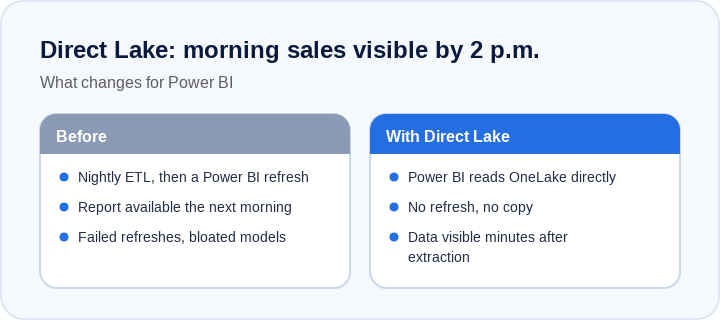
Before: nightly ETL ingestion → Power BI dataset refresh → report available the next morning. With the risk of a failed refresh, datasets ballooning in RAM, and load times of 30 to 90 minutes for large volumes.
With Direct Lake: Power BI reads the Delta Parquet files in OneLake directly. Refresh is limited to metadata (a few seconds) and runs automatically as soon as the tables change; only the queried columns are loaded into memory.
For an SMB that struggled to deliver same-day data, this is a major operational win: the morning's sales are visible at 2 p.m., not the next day.
Copilot in Power BI: democratizing analytics
Copilot in Power BI lets a non-technical user ask a question in plain language ("which regions declined the most last quarter, by product?") and get a relevant visual generated automatically.
It's powerful - provided the semantic model is well built (clear relationships, rigorously named DAX measures, documented table and column descriptions). Without that upfront discipline, Copilot produces inconsistent results and loses users' trust within 2 weeks.
Our method: spend 30% of the project time on the quality of the semantic model, not just on ingestion. That's the investment that unlocks Copilot usage at scale.
Governance through Purview
Fabric integrates natively with Microsoft Purview for governance. This enables:
- Automatic cataloging of Lakehouses, tables, measures, and reports - an employee searching for "Q3 revenue" finds the official asset, not an outdated copy.
- End-to-end lineage: see where a metric comes from, which pipelines it passed through, and which reports consume it.
- Sensitivity labels: a Lakehouse containing personal information can be labeled "Confidential," and Power BI propagates the label to the reports.
- Unified audit logs: who accessed which data, when, and from which application. Essential for Law 25 compliance.
Which Fabric capacity should you choose?
Fabric is billed by capacity (the "F" SKUs), pay-as-you-go or on an annual reservation (more cost-effective for steady usage). The right sizing depends on your data volume and your user count.
- F2 / F4: ideal for a POC - validate the architecture without committing.
- F8: enough for most SMBs at the start (Power BI models up to 10 GB in Direct Lake, everyday usage; OneLake storage is billed separately).
- F16: for SMBs with intensive Power BI usage and several hundred users. Below F64, each Power BI report viewer keeps a Pro licence.
- F32+ / F64: for large organizations or real-time use cases. Note: Copilot in Fabric is available from paid F2 capacities. For a capacity located in Canada, processing happens outside the country and the admin must enable it.
- Already on Power BI Premium Per User (PPU)? Beyond a certain number of users, a Fabric capacity becomes more cost-effective and far more capable. We'll work out the right sizing and pricing for your situation together.
Sources
Want to talk it through?
Let's spend 30 minutes on your situation.
A free assessment with the io4 team. No commitment, no pressure.
Book my assessment