 +1 888 285 9583
 +33 4 12 39 27 40


The client
Quebec private college
- Sector: Education - private schools
- Size: About 400 employees
- Region: Quebec
Student records, HR files and health office records at a Quebec private college were spread across SharePoint, OneDrive, Teams and email. To support its privacy officer, io4 deployed Microsoft Purview: discovery of sensitive information, sensitivity labels with encryption, DLP policies, retention and a dashboard. Anonymized client: figures are rounded to protect confidentiality.
Results at a glance
Key figures.
≈ 120,000
Sensitive files labeled
Found in SharePoint, OneDrive, Teams and email
≈ 300
Risky external shares blocked
Sensitive documents, over 6 months
≈ 40%
Less data kept past retention periods
After the first disposition review
16 wks
From planning to compliance report
Report presented to management
The context
This private college welcomes several thousand students and has about 400 employees: teachers, administrative staff and a health office team. Since moving to Microsoft 365, staff work in SharePoint, OneDrive, Teams and Outlook, with plenty of freedom to share.
Over the years, personal information built up across all these tools: report cards and student records, HR files, enrollment forms, health office notes. Some files travelled as email attachments, others were shared by link with external partners.
As the provisions of Quebec's Law 25 came into force, the privacy officer wanted to present the protection measures in place to management, backed by data. The constraints were clear:
- A complete picture to build, to locate all sensitive information.
- A school calendar to respect, with changes planned outside enrollment and exam periods.
- Employees to support as they learned to classify their documents.
- A small in-house IT team, set to maintain the policies after the project.
The io4 approach
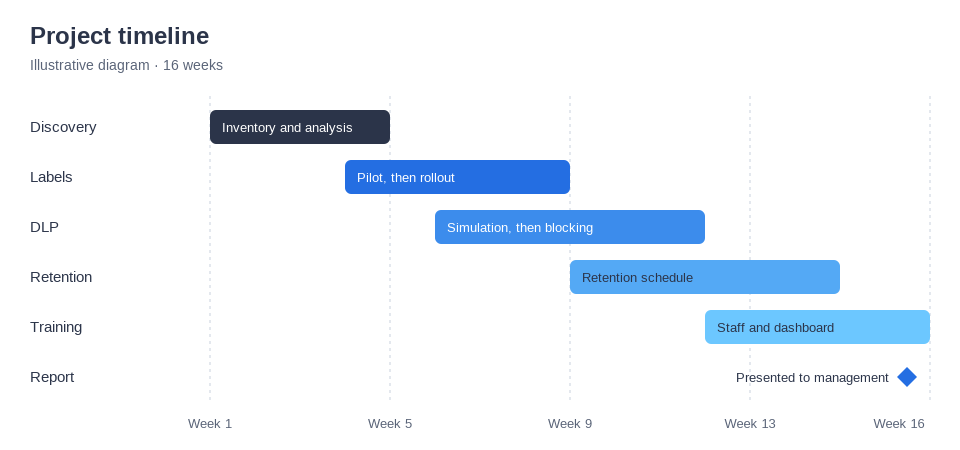
The io4 team ran the project in four stages over 16 weeks: one month of discovery, the rollout of sensitivity labels, DLP policies starting in simulation mode, then retention, staff training and the privacy officer's dashboard.
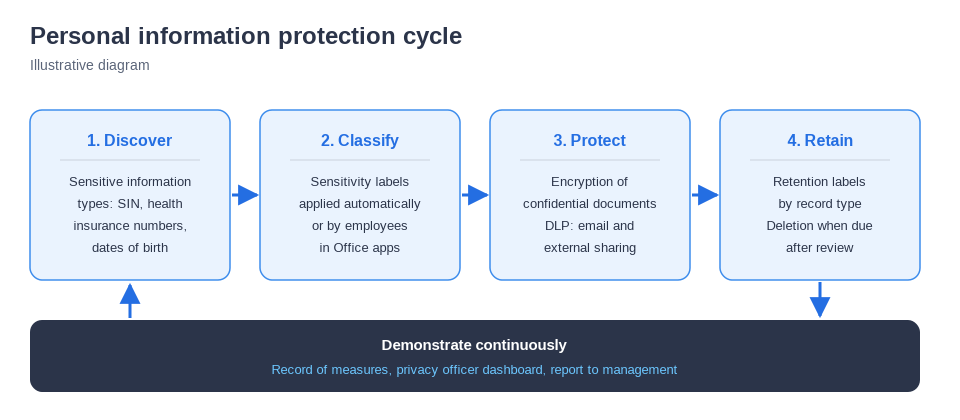
Discovery. Microsoft Purview sensitive information types were used to scan SharePoint, OneDrive, Teams and Exchange Online: social insurance numbers, health insurance numbers and passport numbers. The io4 team added custom types for student ID numbers, dates of birth paired with a name and terms specific to medical records. Content explorer then gave a precise map of personal information by location.
Classification and protection. Four sensitivity labels were defined with the privacy officer: Public, Internal, Confidential and Restricted. The Confidential and Restricted labels encrypt documents and limit access to authorized groups in Microsoft Entra ID. Auto-labeling policies apply these labels to files that contain sensitive information. The DLP policies ran in simulation mode for six weeks, then blocked emailing and external sharing of sensitive documents, with a policy tip that helps employees fix the situation.
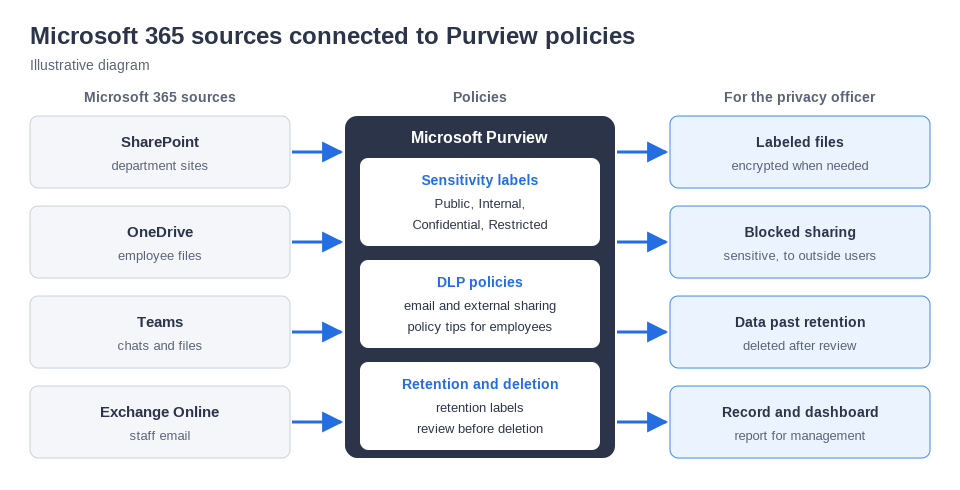
Retention and accountability. With the privacy officer and the departments involved, the io4 team translated the college's retention schedule into retention labels: student records, HR files and health office records each have their own period. When a period ends, a disposition review lets the owners confirm deletion. A record of measures and a dashboard bring the key indicators together for the privacy officer. A 45-minute training session, delivered to each department, prepared staff to use labels every day.
- Initial scan of several million files and emails, across about a hundred SharePoint sites, OneDrive accounts and mailboxes.
- Sensitivity labels available in Word, Excel, PowerPoint, Outlook and Teams.
- DLP rules tuned during simulation to keep false positives to a minimum.
- One champion per department to answer colleagues' questions.
The results
Measured over the 6 months following project start:
- About 120,000 files and emails containing personal information found, then labeled automatically or by employees.
- About 300 attempts to share sensitive documents externally blocked, most of them fixed by the employee thanks to the policy tip.
- About 40% less data kept past the periods in the retention schedule, after the first disposition review.
- A compliance report presented to management, backed by the record of measures and the privacy officer's dashboard.
- An in-house IT team able to adjust policies and add new sensitive information types on its own.
What other organizations can take away
- Start with discovery. A map of personal information by location guides every decision that follows.
- Keep the list of labels short. Four clear levels make adoption easier for staff and for auto-labeling.
- Launch DLP in simulation mode. A few weeks of observation let you tune the rules before turning on blocking.
Microsoft technologies used
A similar topic?
Let's talk about your context.
A free assessment with the io4 team. No commitment, no pressure. You leave with a reasoned point of view.