 +1 888 285 9583
 +33 4 12 39 27 40


Microsoft has announced Purview retention for Microsoft 365 Copilot memory, with rollout planned for fall 2026. That memory is on by default, lives in a hidden folder inside each user's Exchange mailbox, and is discoverable in eDiscovery. What it holds, what you can still control, and the question Quebec's Law 25 forces you to answer.
What Microsoft announced
Roadmap item RM569612 (Message Center notice MC1478965) announces retention for Microsoft 365 Copilot memory, with rollout planned for fall 2026. Purview can now preserve historical versions of memory items for security, compliance and investigation purposes. As of mid-November 2026, Microsoft Learn documentation still stated that Purview retention policies do not apply to Copilot memory: check the actual state in your tenant before relying on it.
To see why this is a change and not just another feature, you need to know where that memory lives. Microsoft stores it in a hidden folder inside each user's Exchange mailbox. It therefore inherits encryption at rest and Customer Lockbox, like the rest of their mail. Until now, though, Microsoft's own documentation was explicit on one point: Purview retention policies did not apply to those items.
Microsoft 365 Copilot memory is on by default, licence or not
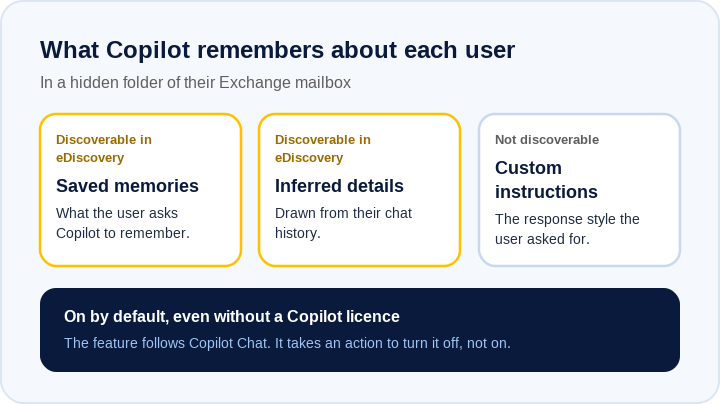
Enhanced personalization is turned on by default. No action is required to switch it on, one is required to switch it off. And it reaches further than most teams assume: the feature is available to Copilot Chat users with or without a Microsoft 365 Copilot licence.
What Copilot keeps falls into three buckets: memories the user saves on purpose, details inferred from their chat history, and custom instructions. The first two are discoverable through eDiscovery and Content Search, under the IPM.Contact item class. Custom instructions are not.
Put plainly: Copilot has spent months building a profile of preferences, working style and project context for every one of your users, inside their mailbox. Your team can check which memory data is accessible through eDiscovery.
Three blind spots retention does not close
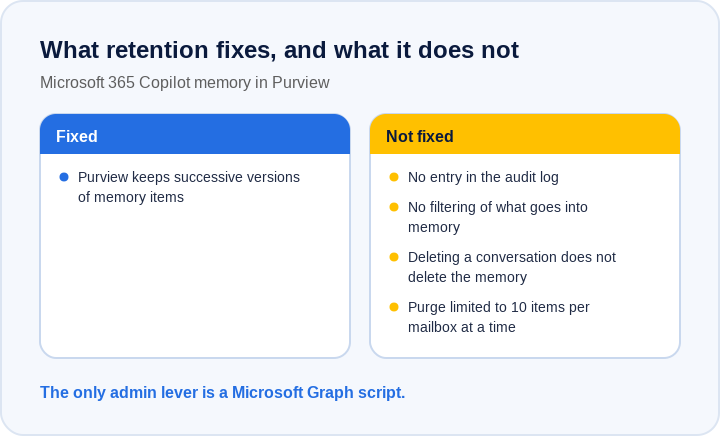
Retention settles preservation. It settles nothing else.
- No audit trail. Memory and personalization actions generate no entry in the Purview audit log. You will not know who changed what, or when.
- No content filtering. An administrator cannot restrict what goes into memory. It is all or nothing.
- Deletion does not follow. Deleting a conversation from Purview or eDiscovery does not delete the associated Copilot memory. And purges are capped at ten items per mailbox at a time: this is an incident response tool, not a cleanup tool.
The only admin lever runs through Graph
There is no PowerShell cmdlet and no admin center screen for this control. Enhanced personalization is configured through Microsoft Graph, using the enhancedPersonalizationSetting resource. A tenant administrator has to write a script.
If you turn it off at the tenant level, users see every personalization control greyed out and cannot turn it back on themselves. This is not a setting, it is a governance decision. Make it deliberately, and document it.
What Law 25 requires you to check
Since September 2023, a Quebec business using technology that can identify, locate or profile a person has to inform that person in advance and offer the means to turn those functions on or off. For public bodies, the Act respecting access to documents goes further at section 65.0.1: those functions must be off by default, and the person has to take a positive step to activate them.
Copilot memory, meanwhile, is on by default.
Does Copilot memory qualify as profiling technology under the Act? That is a legal determination and we are not making it here. But it is exactly the question to put to your privacy officer, with the answer in writing. The same exercise applies under the GDPR for your French entities.
Where to start this week
Five moves, in this order.
- Work out who is actually affected. Memory follows Copilot Chat, not just Copilot licences. Pull the list of active users, not the list of licences purchased.
- Decide the on or off question before the retention question. Leave it on, turn it off for everyone, or turn it off for the groups handling sensitive personal information: that is the first call, and it is made at the tenant level.
- Check that retention is available in your tenant, then turn it on. Without a policy, a saved memory stays until the user deletes it themselves.
- Update your privacy notice and your AI usage policy. An obligation to inform people in advance does not survive a silent rollout.
- Run an access request end to end. An employee asks what the organization holds about them: how long does extraction take, and who does it?
A preview, with very real data
The documentation still marks the feature as preview, which means it can change. That changes nothing about the urgency: the data is already piling up. Every week without a decision is another week of profiles sitting in mailboxes nobody audits.
Sources
- Manage Copilot personalization and memory (Microsoft Learn)
- Search for and delete AI application data in eDiscovery (Microsoft Learn)
- Enhanced personalization control overview, Microsoft Graph (Microsoft Learn)
- Identification, location and profiling technologies (Commission d'accès à l'information, in French)
Want to talk it through?
Let's spend 30 minutes on your situation.
A free assessment with the io4 team. No commitment, no pressure.
Book my assessment