 +1 888 285 9583
 +33 4 12 39 27 40


Since October 19, 2026, every new Copilot Business subscription bought directly from Microsoft comes with usage-based billing already configured; for CSP purchases, default activation has been moved to the January to March 2027 window. What changed, which activities use Copilot Credits, and the settings to review before the default decides for you.
What changed on October 19
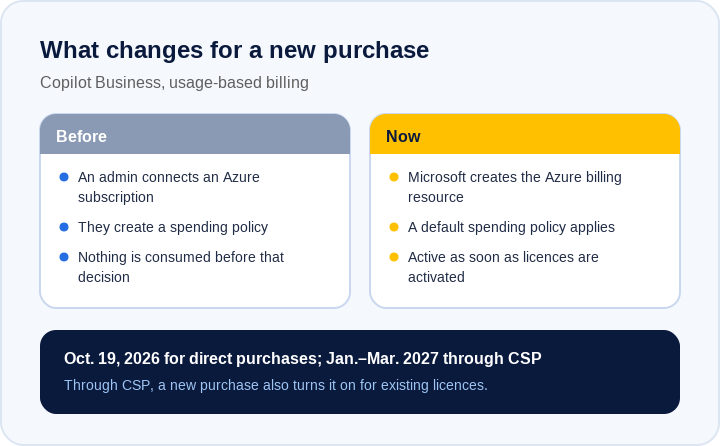
Message MC1476200, published on September 21, 2026, changes the starting configuration of Microsoft 365 Copilot Business. For every new purchase, usage-based billing is active as soon as licences are activated since October 19, 2026 for purchases made directly with Microsoft. For purchases made through a CSP partner, Microsoft moved default activation to the January to March 2027 window (Partner Center announcement of November 3, 2026).
In practice, Microsoft creates the Azure billing resource itself and applies a default spending policy. Existing subscriptions keep their configuration; through CSP, a new purchase also turns on usage-based billing for the tenant's existing Copilot Business licences.
What already existed and what it adds
Usage-based billing is not new. Copilot Credits already serve as a common currency for Microsoft services billed on consumption. Until now, an administrator had to connect an Azure subscription and create a spending policy before any user could consume anything.
The change comes down to one word: preconfigured. The step that forced someone to make a decision is gone. And since Copilot Business is aimed first at small and mid-sized businesses, often without anyone dedicated to cloud billing, that is exactly where the default setting is likely to stay as is.
Which activities use Copilot Credits
According to Microsoft documentation updated on September 25, 2026, credits currently power:
- Copilot Cowork, the agent that carries out complete tasks autonomously;
- Code;
- Autopilot;
- the Work IQ APIs, intended for third-party agents that draw on Microsoft 365 work context;
- GitHub Copilot Harness.
The setting that deserves the most attention
Microsoft says it will add more agents and services over time. Other experiences, such as SharePoint agents or some Copilot Chat usage, fall under separate pay-as-you-go models.
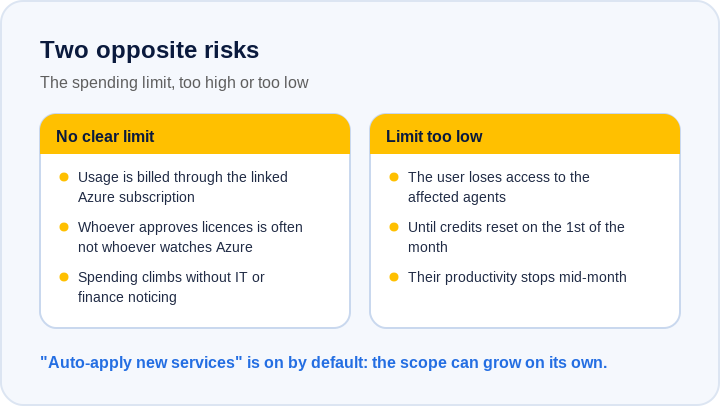
Every spending policy includes the "Auto-apply new services" option, which is on by default. When it is on, any new service or agent that Microsoft makes billable on usage is automatically added to the policy. In other words, your spending scope can grow without anyone in your organization deciding it should.
The real risk: an invoice nobody looks at
A Copilot Business licence is a fixed, predictable cost. Credit consumption, on the other hand, varies with actual usage and runs through the linked Azure subscription. In many organizations, the person who approves Microsoft 365 licences is not the one watching Azure. The possible result: spending that climbs without IT or finance seeing it coming.
The opposite is also a risk. When a user hits their limit, Microsoft is clear: they lose access to the agents and services concerned until credits reset on the first of the month. Set the limit too low for a user who relies on Cowork, and their productivity stops mid-month.
Billing settings to review
Everything happens in the Microsoft 365 admin center, under Copilot, then Cost Management, Configuration tab.
- Check roles: only Global administrators and Billing administrators can create a spending policy. AI administrators and License administrators can edit one, not create it.
- Review the default policy as soon as licences are activated: it caps usage at 4,000 Copilot Credits per user per month, a threshold to adjust for your groups.
- Set a monthly limit for the organization and, where needed, per user. Target a pilot group rather than everyone.
- Configure alert thresholds and include someone from finance, not just IT.
- Turn off "Auto-apply new services" if you want to approve each new service before it consumes credits.
- Give read access to the consumption dashboards to the people who track the budget.
If you buy through a CSP partner
For licences purchased through a partner, default activation is planned between January and March 2027. If you plan to add or renew Copilot Business licences, use the order to decide on the spending policy at the same time: who gets access, what limit, who receives the alerts. This is the right moment to do it with your partner, rather than after the first invoice.
Decide before the default decides for you
Usage-based billing is not a trap: it is what gives access to Copilot's most useful agents. But a default setting is not a policy. A few settings in Cost Management, checked at purchase or renewal, keep your Azure invoice predictable.
Sources
Want to talk it through?
Let's spend 30 minutes on your situation.
A free assessment with the io4 team. No commitment, no pressure.
Book my assessment