 +1 888 285 9583
 +33 4 12 39 27 40


The client
Quebec distributor
- Sector: Distribution
- Size: About 300 employees
- Region: Quebec
A Quebec distributor with about 300 employees managed its security across several consoles, while its Microsoft 365 E5 Security licenses already included Microsoft Defender. As its FortiClient licenses came up for renewal, io4 deployed Microsoft Defender for Endpoint through Intune, removed FortiClient in waves and brought device, email and identity detection together in Microsoft Defender XDR, in 12 weeks. The Fortinet firewall stays in place. Anonymized client: figures are rounded to protect confidentiality.
Results at a glance
Key figures.
1
Security console
Microsoft Defender XDR for devices, email and identities
≈ 30%
Lower annual cost
On endpoint security licenses
100%
Of devices and servers covered
Defender for Endpoint in active mode
≈ 60%
Faster alert handling
Average handling time, measured over 3 months
The context
The company distributes products across Quebec and has about 300 employees, split between offices and several warehouses. Its fleet includes about 350 devices, including shared warehouse workstations, and around thirty servers.
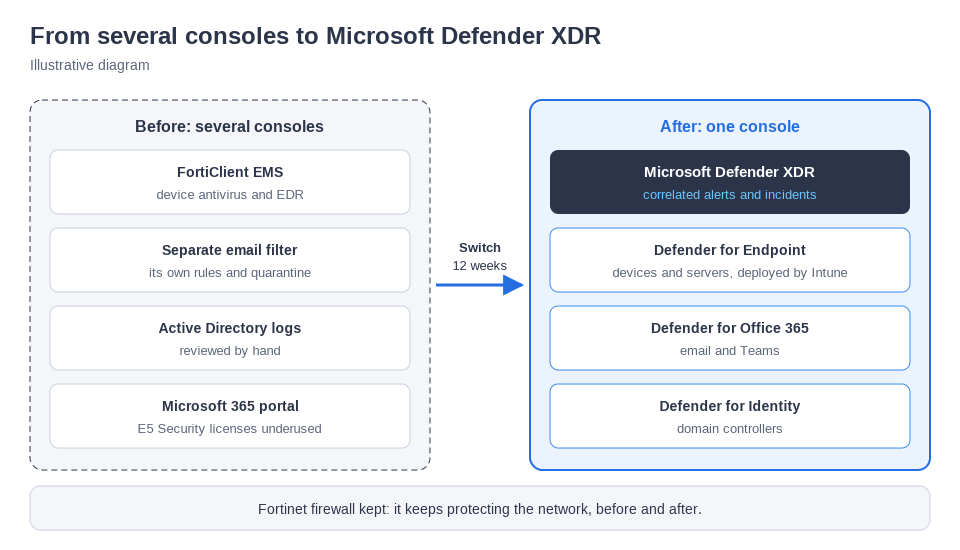
Endpoint protection relied on FortiClient and its EMS console. Email went through a separate filter, and Active Directory logs were reviewed by hand. The IT team therefore switched between several consoles to follow a single threat. The year before, the company had added Microsoft 365 E5 Security to its licenses, which already included Microsoft Defender for Endpoint, Defender for Office 365 and Defender for Identity.
The FortiClient licenses were coming up for renewal. Management chose to make full use of the Microsoft licenses it already paid for and to bring detection into a single tool. The Fortinet firewall stayed in place. The constraints were clear:
- A FortiClient license renewal date to meet.
- Warehouses running two shifts, where every stopped device slows shipping.
- Continuous protection of every device throughout the switch.
- A small internal IT team to support during the project.
The io4 approach
The io4 team ran the project in five stages over 12 weeks: two weeks of inventory, a Defender for Endpoint rollout in passive mode, a gradual activation of attack surface reduction rules, the removal of FortiClient in three waves, then two weeks of follow-up and fine-tuning.
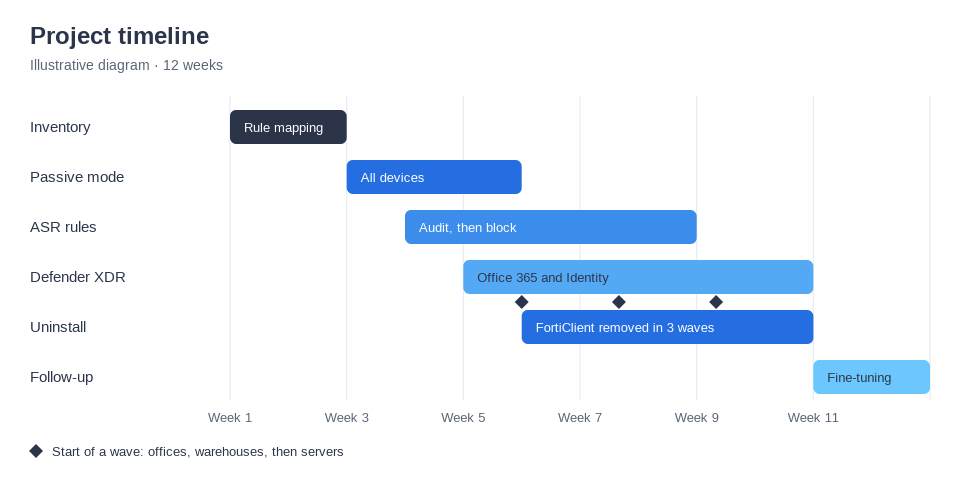
Inventory. The io4 team mapped each FortiClient rule to its Defender equivalent: antivirus policies, device control, exclusions and web filtering. Exclusions for the warehouse management software and barcode scanners were validated with the IT team before any change.
Passive mode, then active. Microsoft Defender for Endpoint was deployed through Intune to a pilot group, then to the whole fleet, alongside FortiClient. Microsoft Defender Antivirus ran in passive mode while EDR detection was already raising alerts. Attack surface reduction (ASR) rules started in audit mode, then moved to block mode after a review of false positives.
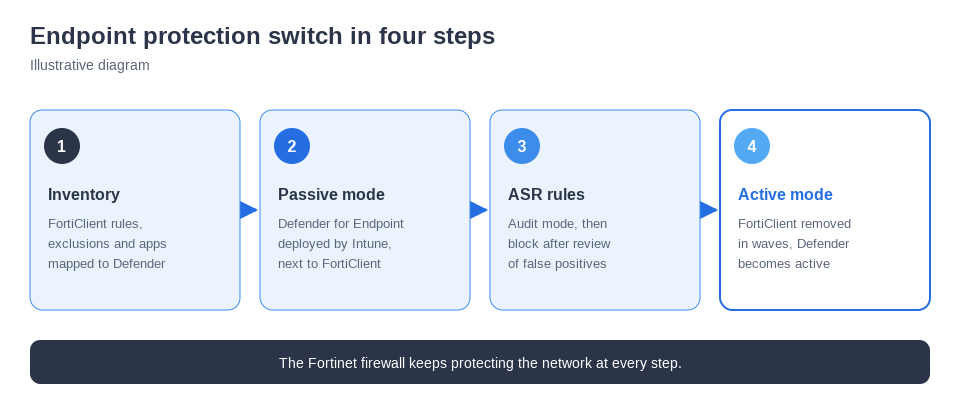
Removal and centralization. FortiClient was uninstalled in three waves: offices first, then warehouses, and finally servers. With each wave, Defender Antivirus switched to active mode and tamper protection was turned on. In parallel, Defender for Office 365 took over from the email filter, Defender for Identity was installed on the domain controllers, and all alerts converged in Microsoft Defender XDR.
- Devices and servers onboarded to Defender for Endpoint through Intune policies, fully remotely.
- Servers covered by Defender for Endpoint for Servers licenses.
- Warehouse waves scheduled between two shifts.
- Alert handling guide and IT team training in Defender XDR.
The results
Measured over the 3 months after the last FortiClient device was removed:
- One console, Microsoft Defender XDR, for devices, servers, email and identities, with correlated incidents.
- Annual endpoint security license costs down by nearly 30%, thanks to the Microsoft licenses already in place.
- Average alert handling time down from about 4 hours to about 1.5 hours.
- 100% of devices and servers protected by Defender for Endpoint in active mode, with tamper protection.
- A Microsoft Secure Score up by about twenty points, and shipping maintained in every warehouse during the switch.
What other organizations can take away
- Review your Microsoft licenses before a renewal. Defender is often already included, and a contract end date is the right moment to consolidate.
- Use passive mode. Defender for Endpoint observes and detects next to the current tool, so you can validate exclusions before switching.
- Turn on ASR rules in audit mode first. A few weeks of measurement are enough to move to block mode with confidence.
Microsoft technologies used
A similar topic?
Let's talk about your context.
A free assessment with the io4 team. No commitment, no pressure. You leave with a reasoned point of view.