 +1 888 285 9583
 +33 4 12 39 27 40


Microsoft raised Microsoft 365 prices on July 1, 2026 (E3, E5, Business, Apps, Entra). What it means for a Québec SMB and how to prepare your next renewal.
The July 1, 2026 Microsoft 365 price increase, in plain terms
On March 24, 2026, Microsoft confirmed a global price increase on its commercial Microsoft 365 suites, effective July 1, 2026. For any Québec SMB that pays for Microsoft 365 licences monthly or annually, the timing of your renewal determines your price: since July 1, 2026, every renewal moves to the new rate; an agreement renewed before that date keeps the previous price until its next renewal.
The increase touches a wide range of products: Office 365 E3/E5, Microsoft 365 E3/E5, Microsoft 365 Apps, Business Basic and Business Standard, the Frontline F1/F3 SKUs, plus standalone Entra P1/P2 and Windows E3/E5. It does not apply to standalone Teams SKUs or standalone Copilot licences, which follow their own timeline.
Good news for smaller shops: Microsoft 365 Business Premium — the most common suite among SMBs of 30 to 200 employees — stays at its current list price in the table Microsoft published.
By how much: the increase per product
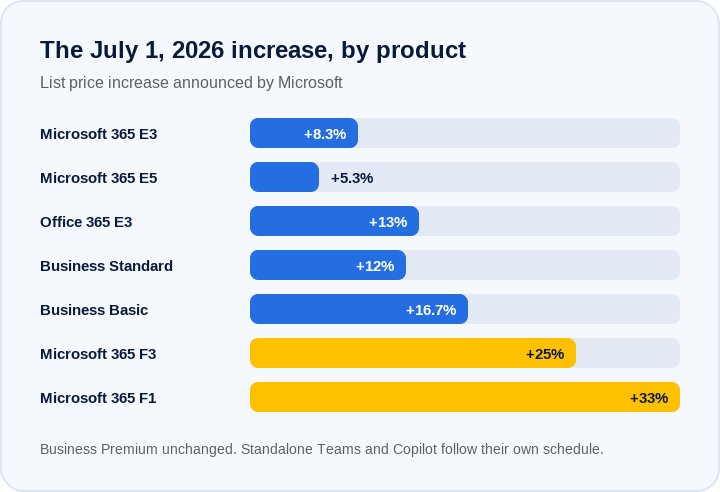
Here are the list-price increases announced by Microsoft and echoed by industry analysts, expressed as a percentage per product:
- Microsoft 365 E3: +8.3%.
- Microsoft 365 E5: +5.3%.
- Office 365 E3: +13%.
- Microsoft 365 Business Standard: +12%.
- Microsoft 365 Business Basic: +16.7%.
- Microsoft 365 F3 (Frontline): +25%; F1: +33%.
Why your bill can climb more than the headline percentage
The list percentage only tells part of the story. For organizations on an Enterprise Agreement, Microsoft removed automatic volume discounts (Levels B, C, and D) back in November 2025. The result: a large enterprise that used to enjoy a built-in discount now pays full list price, and the July increase stacks on top of that. For large accounts, the list-price increase therefore adds to the loss of the volume discount, which typically represented 6 to 12%.
For a typical Québec SMB on CSP (Cloud Solution Provider) rather than an EA, the stakes are different but real: the list-price increase flows through at your next renewal, and any cost indexed to your Microsoft spend (support, certain add-ons) rises mechanically. The public sector and nonprofits also move to the new grid at their next renewal.
The practical takeaway: don't anchor on the percentage in the news. The only number that matters is the gap between today's bill and your next renewal bill, at the same headcount.
What you pay more for — and what you actually get
Microsoft justifies the increase with new capabilities added to the suites. Some carry real value for an SMB; others are redundant if you already own the equivalent. The main additions to the suites in 2026:
- Microsoft Defender for Office 365 Plan 1 included in E3 and Office 365 E3: Safe Links, Safe Attachments, anti-phishing. Genuine consolidation if you already bought that protection separately; an added cost if you never planned to use it.
- Several Intune capabilities (Remote Help, Advanced Analytics, Intune Plan 2) added to E3 and E5 — useful if you're pushing device management, neutral otherwise.
- For E5: a Security Copilot allocation (400 SCU per 1,000 users/month, capped), Endpoint Privilege Management, Microsoft Cloud PKI.
- For E1, Business Basic, and Business Standard: a URL check (a subset of Safe Links) added at click time.
The real question: are you paying for licences you use?
Before you absorb the increase, ask the right question: does your licence estate match your actual usage? In most of the audits we run at io4, we find seats paid for and never used (departures left unrevoked), users on a pricier suite than they need, and add-ons that overlap with capabilities already included. Every seat you remove or right-size before renewal compounds across the whole term of the agreement.
It's exactly the FinOps reflex we apply on the Azure side, and the same logic applies to licensing: visibility first, optimization second. A price increase is the ideal moment to do this cleanup — the savings from optimization often absorb a good chunk of the increase.
The io4 action plan before your renewal
Here's the approach we recommend to our SMB, enterprise, and public-sector clients before every renewal:
- Map your estate: number of licences per suite, active vs. dormant seats, renewal dates. This is the step that pays off the most.
- Model the gap between your current bill and the rate that applies at renewal, against your real SKU mix.
- Check the price that applies to your agreement: a renewal completed before July 1, 2026 locked in the previous pricing for its full term, and the next one will be at the new rate.
- Optimize before you sign: downgrade over-provisioned users, remove unused seats, drop add-ons now redundant with the new inclusions (Defender P1, Intune).
- Check data residency: confirm your tenant is hosted in Canada and that your transfers outside Québec are documented in a privacy impact assessment (s. 17, Law 25).
Bottom line: prepare your next renewal
The July 2026 increase is a good moment to take back control of your Microsoft spend: audit, optimize, then choose the right time to renew. An SMB that prepares its renewal a few months ahead has time to compare the options.
If you want a clear read on your estate and the real impact of the increase on your situation, talk to an io4 expert. We run the licence audit and renewal strategy with the same FinOps approach we use on Azure — no jargon, and without selling you seats you don't need.
Sources
Want to talk it through?
Let's spend 30 minutes on your situation.
A free assessment with the io4 team. No commitment, no pressure.
Book my assessment