 +1 888 285 9583
 +33 4 12 39 27 40


The Extended Security Update program for Exchange Server 2016 and 2019 ended on October 31, 2026. The timeline, the three exit paths and what to watch for when coexisting with Exchange SE.
Exchange 2016 and 2019: what changed on October 31, 2026
In October 2026, Microsoft shipped its last security updates (on October 13) for Exchange Server 2016 and 2019, including for organizations enrolled in the Extended Security Update (ESU) program. End of support was October 14, 2025; October 31, 2026 marks the end of extended security updates.
The Exchange team has confirmed there will be no third period. Any organization still running an on-premises Exchange server, including the single hybrid server kept for management, benefits from choosing its target now.
End of support versus end of extended security updates
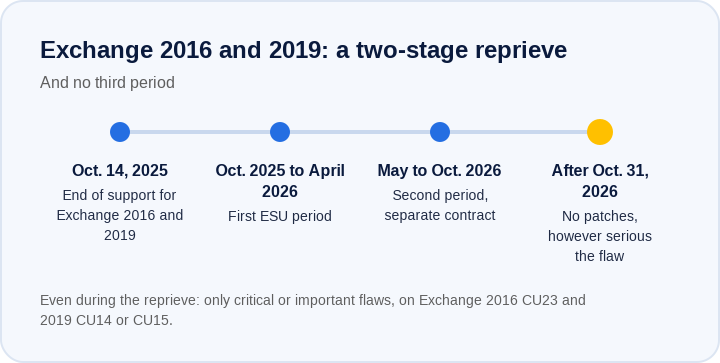
The reprieve came in two stages, and the second one will not be renewed.
- October 14, 2025: end of support for Exchange 2016 and Exchange 2019.
- October 2025 to April 2026: first ESU period.
- May 1 to October 31, 2026: second period, sold under a separate contract. Enrolment in the first period did not carry over.
- After October 31, 2026: no fixes, however severe the vulnerability.
Narrow coverage, even during the reprieve
Only vulnerabilities rated Critical or Important by Microsoft were fixed, and only on Exchange 2016 CU23 and Exchange 2019 CU14 or CU15. A server left on an older cumulative update was not covered, ESU or not.
Why an unpatched Exchange server is a risk of its own
An Exchange server is not a file server hidden behind the firewall. It publishes Outlook on the web, ActiveSync and Autodiscover to the internet, it holds every mailbox in the organization and it has elevated rights in Active Directory. It is a well-known target: the ProxyLogon vulnerabilities of March 2021 were exploited at scale within days.
Keeping such a server without fixes is also a compliance issue. Quebec's Law 25 and the GDPR in the European Union require reasonable security measures to protect personal information. An exposed system left unpatched on purpose is hard to defend after a privacy incident.
Three exit paths
The right choice depends on what is still on premises and why it is still there.
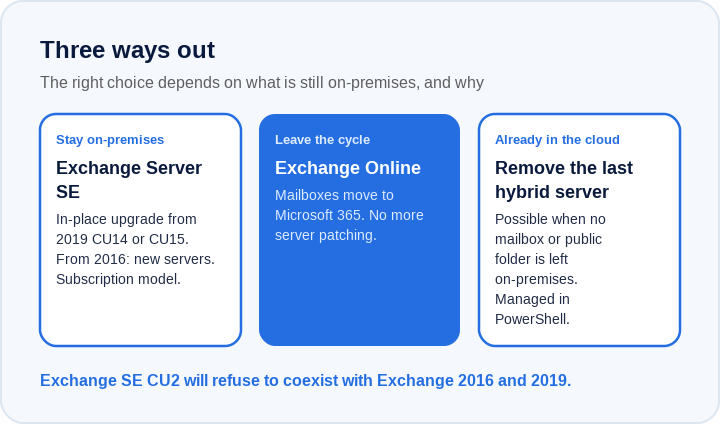
- Exchange Server SE (Subscription Edition), to stay on premises. From Exchange 2019 CU14 or CU15, the upgrade is done in place, like a cumulative update. From Exchange 2016, there is no shortcut: you add new servers, move the mailboxes, then remove the old ones. The model moves to a subscription.
- Exchange Online, to leave the patching cycle behind. Mailboxes move to Microsoft 365 and server updates are no longer your problem.
- Removing the last hybrid server. Many organizations already on Exchange Online keep an Exchange 2016 or 2019 server only to manage recipients. Microsoft lets you remove it and switch to the Exchange Management Tools in PowerShell, under certain conditions: no mailboxes or public folders left on premises, synchronization through Microsoft Entra Connect or Entra Cloud Sync, and no need for the on-premises Exchange admin center or for auditing of administrative actions.
The coexistence trap
The smooth migration, where old and new servers run side by side while mailboxes move, has an expiry date. According to Microsoft, an upcoming Exchange SE cumulative update will refuse coexistence with unsupported versions, including Exchange 2016 and 2019.
In practice, an organization that waits may have to remove all its old servers before it can install the next Exchange SE update. That is a much harsher cutover than a gradual migration. And for those still running Exchange 2013 in their environment, Exchange SE already refuses to coexist with it from its very first release.
Four steps to move off Exchange 2016 and 2019
Start by choosing your target and reducing the exposure of the servers still running, then plan the migration.
- Inventory every Exchange server, including hybrid and "forgotten" ones, with their version and cumulative update.
- List what still runs through them: SMTP relay for applications and multifunction printers, shared mailboxes, public folders, connectors.
- Pick a target for each server: Exchange SE, Exchange Online or outright removal.
- During the migration, limit what is published to the internet and step up monitoring of the servers still in place.
Conclusion: choose the target for each server
Since October 31, 2026, Exchange 2016 and 2019 no longer receive security fixes. Inventory the affected servers and choose your target: Exchange SE, Exchange Online or a minimal hybrid environment.
If you don't know exactly how many Exchange servers are still running in your organization, or what depends on them, talk to an io4 expert. We take the inventory, recommend the right target for each server and run the migration to Exchange Online or Exchange SE.
Sources
Want to talk it through?
Let's spend 30 minutes on your situation.
A free assessment with the io4 team. No commitment, no pressure.
Book my assessment