 +1 888 285 9583
 +33 4 12 39 27 40


Announced on November 17, 2026 in public preview, a new Intune compliance policy detects unapproved AI agents on Windows devices. Conditional Access can then cut off access to the organization's resources. How it works, what it covers and where to start.
AI agents that work right on the device
AI assistants now work directly on the workstation. Claude Code, GitHub Copilot CLI and Codex CLI install on the device and act with the user's permissions. They read files, access code repositories, automate tasks and reach external services. Microsoft says so in its guide published on November 17, 2026: these local agents are now part of everyday work.
For an IT team, the question becomes very concrete. Which agents run on our devices? Which ones have we approved? How do we remove access to the organization's data from a device that runs an agent outside the approved list?
At Ignite 2026, Microsoft answered with three complementary controls. The most direct one is an Intune compliance policy that blocks unauthorized AI agents.
Blocking unauthorized AI agents with Intune: how it works
Intune's new software compliance policy has been in public preview since November 17, 2026. It relies on a list of restricted software. The admin adds the identifier of the app that hosts the agent: the MSI product code for a Win32 app, or the package full name for a Store app.
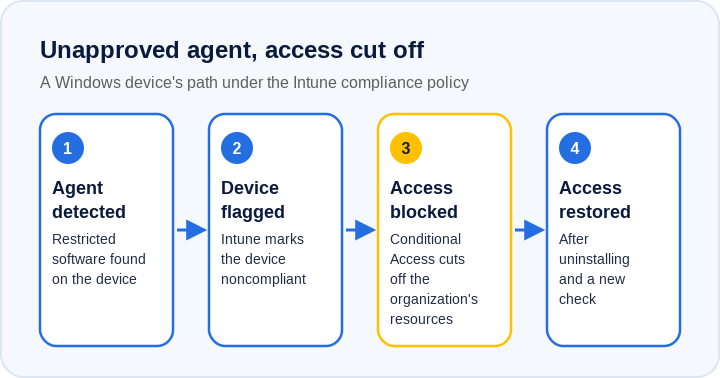
When Intune finds restricted software on a targeted device, it marks that device noncompliant. A Conditional Access policy that requires a compliant device then cuts off access to protected resources. The block covers the whole device, even when the agent is idle. The user gets a custom message that explains what to do. Once the agent is uninstalled, the user requests a new check and gets access back as soon as compliance is confirmed.
To find agents, Microsoft Agent 365 brings together inventory signals from Defender, Intune and Entra.
What the preview covers
The policy identifies apps, and a single agent can run through several apps. Microsoft notes that an agent sometimes maps to several host apps. You then need one entry per app in the restricted list.
A preview evolves before general availability. The right move is to test it with a pilot group and keep your other controls in place. Here is what it covers today:
- Devices covered: Windows devices enrolled in Intune and joined to Microsoft Entra ID.
- Apps covered: Win32 apps and Store apps visible in the Intune app inventory.
- Cover another way: code editor extensions, npm packages and standalone executables, which this preview leaves out of the selection list.
- Prerequisite: a Conditional Access policy that requires a compliant device.
Three controls to manage AI agents on Windows
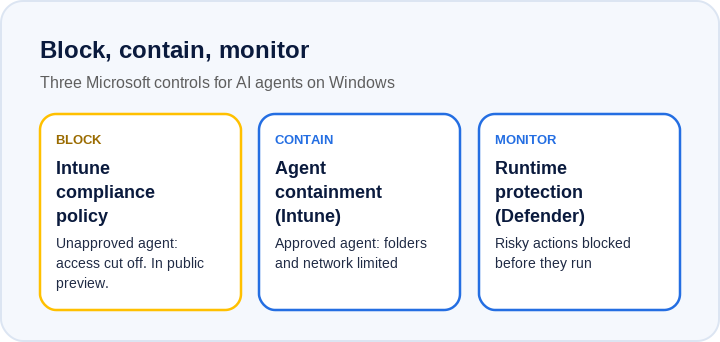
The compliance policy is clear-cut: the agent goes, or the device loses access. Microsoft adds two finer controls for approved agents, plus a way to protect data inside AI apps.
- Contain: Intune's agent containment policy builds on Microsoft Execution Containers, available on Windows 11. It sets a ceiling on folder access (deny, read-only or read-write) and network access. It starts with GitHub Copilot CLI and OpenAI Codex CLI.
- Monitor: Microsoft Defender AI agent runtime protection detects prompt injection. It also blocks some high-risk actions before they run, for Claude Code and GitHub Copilot CLI, with more agents added through updates. Microsoft recommends starting in audit mode, then moving to block. It requires Defender for Endpoint P2, Microsoft 365 E5, Agent 365 or Microsoft 365 E7.
- Protect data: Microsoft Copilot, GitHub Copilot, Claude and ChatGPT now integrate the Intune SDK. You can therefore apply app protection policies to them.
Where to start in your organization
Five steps are enough to get started. The io4 team can run them with you: device inventory, Intune policies, Entra ID Conditional Access and Defender protection, together with io4 SOC.
- Take inventory: find the agents already present with Agent 365 and the Intune app inventory.
- Decide: list the approved agents and the ones to remove, with the teams that use them.
- Prepare the message: write the text users will see, with the steps to follow.
- Pilot: apply the policy to a test group, check Conditional Access, then expand.
- Complete: turn on Defender protection in audit mode for approved agents.
Sources
Want to talk it through?
Let's spend 30 minutes on your situation.
A free assessment with the io4 team. No commitment, no pressure.
Book my assessment